Test an offline cashier before you pay: 7 questions, a 10-minute check
Seven questions and a ten-minute test: switch the internet off on the device, sell an item, and watch how the sale is kept and uploaded once.
The Dashing teamUpdated 8 min read
An offline cashier keeps selling when the connection drops, because it saves each sale on the device itself and uploads it once, by itself, when the internet is back. In Dashing this works on the free plan exactly as on the yearly plan, and the free plan is the whole shop for one branch: free forever, not a trial.
Updated October 2026
"Works offline" is printed on many boxes and means different things. This guide explains what happens inside the cashier when the line goes down, what does not work without a connection, and gives you seven questions and a ten-minute test to run in your own shop before you pay for any software, ours or anyone else's. The guide is written by the Dashing team, so judge what we say by the test.
What does "offline" actually mean?
Three different things hide under the word:
- A web page waiting for the network. Every tap needs the internet. When it drops, the sell button waits. Some products cache the item list so the screen looks alive, but the sale cannot be saved.
- A computer in the shop that holds everything. The tills talk to a PC in the back room over the shop's network. It works with no internet, but the whole record sits on one disk, backups happen if someone remembers, and a second branch is a second island.
- Each till works alone, then sends. The device keeps a copy of what it needs (items, prices, the cart) and a list of what it sold. When the network returns, the waiting sales upload by themselves. This is how Dashing works.
The question that tells them apart: "Where is the sale stored while the internet is down?" If the answer is "it isn't", you have the first kind.
Why it matters in Iraq
Outages are an ordinary event: a provider's line, a router, the power. On national exam days the Ministry of Communications cuts the internet across the country for hours. Internet Society Pulse counted more than 80 such shutdowns in the two years to May 2025, typically from 6:00 to 8:00 in the morning. A shop that cannot sell during those hours loses customers who do not come back.
What happens inside Dashing, step by step
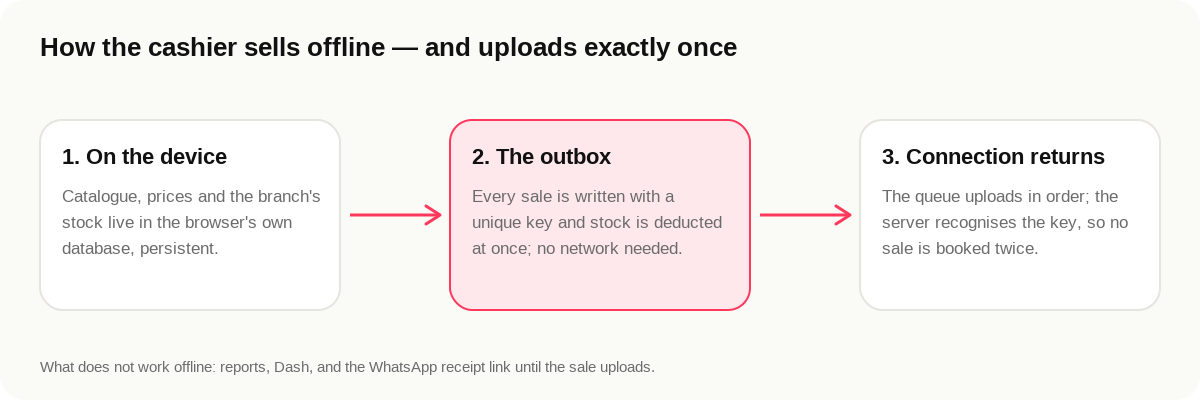
Before the outage. Each time the device is online it refreshes its local copy of items, barcodes, units, prices and the branch's stock. The app asks the browser to keep that data permanently, so a restart or low disk space does not wipe it.
During the outage. The cashier scans, discounts, holds and resumes carts, takes payment and prints the 80 mm receipt through the print dialog. Each finished sale is written to an outbox on the device with its own reference number, and stock on the device drops at once, so the next sale sees the right quantity. The screen never asks the cashier to wait; a small indicator says "saved on this device, not yet uploaded".
When the connection returns. The outbox uploads in order. If the upload is cut in the middle and retried, Dashing recognizes the sales it already has and does not book them twice. Two hundred sales made during a two-hour shutdown arrive as two hundred, not 199 and not 201. If Dashing refuses a sale because of something inside it, such as an item with zero stock in a shop that does not allow negative stock, the sale goes to the recovery drawer with the reason, for the owner to decide.
If the device is closed before the upload. The outbox stays on the device and uploads the next time the app opens with a connection. If two windows are open, only one sends at a time.
How many days? And what about device space?
There is no time limit. The cashier works until the browser's storage on the device fills up. One sale is a few kilobytes, so a full day in a busy shop is under one megabyte. At 80% full the app warns you; at 95% it stops new sales until the waiting ones have uploaded and space is free, so a half-saved sale never happens. A sale's time is set by Dashing's clock rather than the device's, so a device with the wrong date cannot misdate sales.
What still needs a connection
- Signing in. Anyone who signed in before the drop keeps selling, and the sign-in stays valid while the device connects now and then within 14 days.
- Financial reports, the morning brief and Dash (the AI assistant).
- Keeping branches up to date with each other. Another device in the same branch does not see the stock deduction before the upload.
- The WhatsApp receipt link. The sale and the printed receipt work; the link is made by Dashing, so the WhatsApp button waits until the sale has gone up, then opens with one tap.
- Closing a shift. It waits until every sale on the device has uploaded, because a drawer closed on incomplete numbers is worse than a late one.
- A brand-new item the device has never downloaded cannot be sold by barcode until the device has seen it once online.
- Clearing browser data. On a device holding sales that have not uploaded, this is the one way to lose them. Leave the device alone until it has uploaded.
Power cuts and internet cuts are not the same
An offline cashier does not replace electricity. The device needs a battery or a supply, and a thermal printer needs power too. A laptop, phone or tablet with enough charge can sell for hours with no line, and print as long as the printer runs. If power fails to both device and printer, the problem is not the internet. Ask which cut happens more often in your shop and pick your hardware by that answer.
Seven questions for any cashier software
- Where is a sale stored while the internet is down?
- What happens if the upload stops halfway? Can a sale be booked twice?
- Is stock deducted on the device at once?
- Do returns and adding or editing a customer work offline?
- Does card payment work offline? If not, what is the fallback?
- What happens to closing the shift?
- Is this on the free or cheapest plan, or only on the top plan?
A ten-minute test in your shop
- Sign in while connected, open the sell screen and wait for the items to appear.
- Turn on airplane mode.
- Make three sales: one cash, one with a discount, one on credit.
- Print a receipt.
- Try a return and try adding a new customer. Write down what works.
- Close the app completely and reopen it. The three sales should still be there, marked "not uploaded".
- Turn airplane mode off and wait.
- Open the sales list. You should see three sales, each once.
- Check that stock dropped by three sales and no more.
- In a second run, try closing the shift before the upload and note how the software behaves.
If a step fails, you found out in your shop, not on exam morning.
How other products behave offline
From each vendor's own public pages, read in October 2026. We did not test them ourselves.
- Loyverse: sales and shifts work offline. Its help page says refunds are disabled, new or edited customers are not saved, stock levels are not shown, card terminals do not work, and you cannot log out with unsynced receipts.
- Daftra: offline POS terminals are on its top plan, Premium, only.
- Zoho POS: says billing continues offline and syncs later. Iraq is not on its launch list.
- RA8M, Almas and Dexef: claim offline working with sync. We have not tested them.
- Kashier (kashir-iq): we found no offline claim. Unknown.
Free forever for one branch, not a trial
The offline cashier is on the free plan. The free plan is the whole shop for one branch: the cashier, stock, invoices, customer debts and accounting, with no expiry date and no card at sign-up. Every new shop starts on the free plan. The yearly plan adds two things: a second branch and priority WhatsApp replies. It costs 420,000 IQD per shop in Iraq, about 300 USD elsewhere, paid once through a WhatsApp message, with no auto-renewal and a 14-day money-back guarantee.
What Dashing does not do
- It is not an app-store app; it runs in the browser and can be installed from it.
- It prints 80 mm receipts only, has no customer-facing display, and does not connect to the scale itself; you type the weight or scan a price-label scale's barcode.
- It does not solve power cuts, and it cannot sell on a device that never signed in before the drop.
- It sends no automatic debt reminders; your staff send them with one tap.
FAQ
Can I sign in without internet? No. Signing in needs a connection. After that you stay signed in while the device connects now and then within 14 days.
What if the connection drops during the upload? It is retried automatically until it goes through. Each sale has its own reference, so none is booked twice.
Is stock deducted while I am offline? Yes, on the device at once; Dashing's stock matches when the sale goes up. Another device in the same branch does not see it before then.
Is this feature on the free plan? Yes, on free and yearly alike.
For the feature itself see Works offline, and for the plan see the free plan.
Related reading: Where your shop's data lives, who sees it, and how you get it back.
Sources
- Internet Society Pulse, Iraq to Shutdown Internet During 2025 Exam Period, https://pulse.internetsociety.org/en/blog/2025/05/iraq-to-shutdown-internet-during-2025-exam-period/
- NetBlocks, Iraq shuts down internet to prevent cheating in national science exams, https://netblocks.org/reports/iraq-shuts-down-internet-to-prevent-cheating-in-national-science-exams-gBLk94A4
- Dashing, Works offline
This article is also available in العربية · کوردی