Stock per branch, by the carton or the piece, by the batch and its expiry date.
You upload your item sheet from Excel as a CSV file and it becomes your stock in Dashing; after that every sale reduces the quantity by itself, so you stop counting the shelf by hand to know what is left. You manage it without an accountant or training, because column headers are read in Arabic or English and you see a preview before anything is saved. Stock is deducted on the device even when the internet is down, and the screens are in Arabic, Kurdish or English. When you scan a barcode that is new to your shop and the device is online, Dashing suggests, in empty fields only, the item's name with its brand and size, a category you already have and a photo of the pack. It never suggests a price, you check it and save, and many local items are not in the lists. A Save and add another button keeps the form open for the next item, and an item's photo shows on the cashier grid.
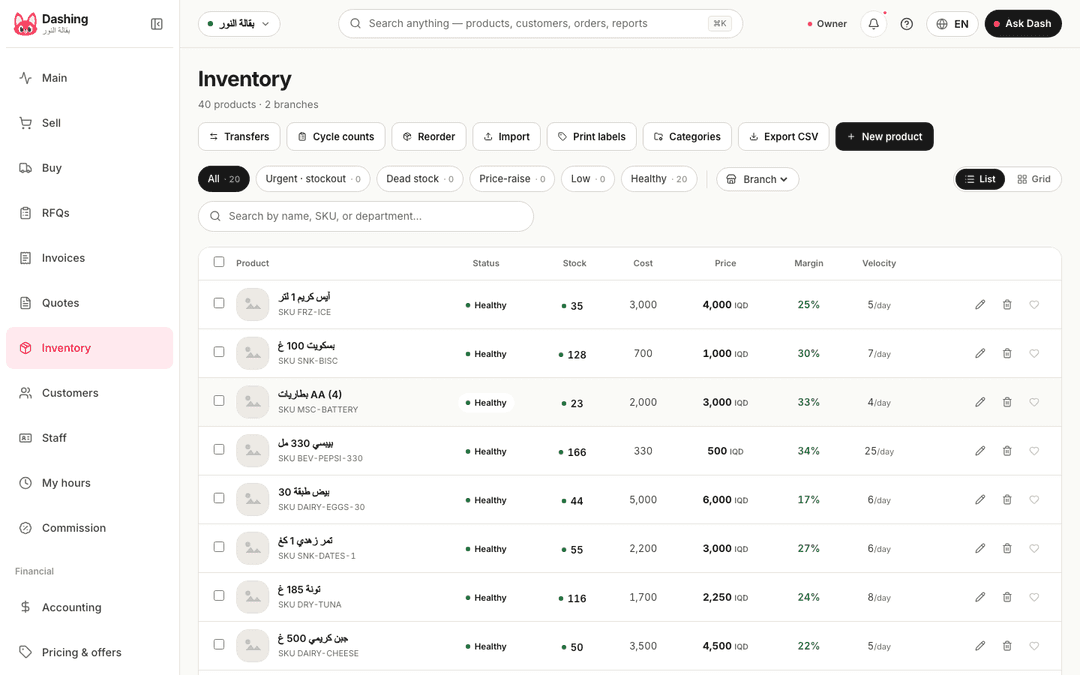
Watch it work
What you do on day one
- Save your sheet as a CSV file, then tap "Import" at the top of the inventory page.
- Check the preview: how many items will be created and which rows have errors, then save.
- Put today's quantity in the "quantity" column to start from your real stock, and a minimum for the items you never want to run out of.
- Sell one item at the cashier and watch the quantity drop.
From Excel to Dashing
Columns are recognized by their headers, in Arabic or English: "الرمز" or item_code, "الاسم" or item_name and "السعر" or sale_price are required; "التكلفة", "الكمية", "الحد الأدنى" and "الباركود" (cost, quantity, minimum stock, barcode) are optional. The import creates items and never edits existing ones: a code that already exists is skipped. A quantity column books opening stock to the main branch. Importing 500 items with their stock takes about 6 seconds.
The carton and the piece
One item can have several units, each with a conversion factor and its own barcode: a case of 12 bottles of water scans with its barcode and deducts 12, while a single bottle scans with its own and deducts 1; stock is always kept in the base unit. Each unit has its own price. Fractional quantities are accepted, such as 2.5 kilos of cheese or 3.5 metres of cable, with the weight typed in or read from a price-label scale's barcode.
Batches and expiry dates
Every receipt is recorded as a batch with its expiry date. At the sale the cashier suggests the batch closest to expiry; an expired batch is flagged and can only be sold with an explicit confirmation, recorded under the name of whoever confirmed it. A home-screen card lists what expires within 30 days, and that window can be changed in Settings. Batches are switched on only for the items that need them.
Try Dashing in your shop, free, no card.
Start freeBranches and transfers
- An independent quantity per branch, with cost of goods sold computed per branch
- Transfers between branches: created, then "in transit", then received or canceled; the system suggests a transfer itself when an item runs out in one branch and sits unsold in another
- A minimum per item: when the quantity reaches it, the item appears on the low-stock list and on a home-screen card, and a draft purchase order is one tap away
Counts and adjustments
A cycle count records what is on hand item by item while selling continues, and the difference is posted as an accounting entry after approval. Each count is opened for one branch and compares against that branch's shelf. A manual adjustment (damage, loss, correction, restock) posts an entry and is logged in the audit log with who made it and when. There is no screen listing a single item's movements; the audit log keeps adjustments, counts and transfers, and Dash answers "what moved this item?" in the chat.
The item name from the barcode
When you scan a barcode your shop does not know, Dashing looks it up in the names other shops have added and in open product lists, and suggests the name, and sometimes a category you already have and the front photo. It never suggests a price, and nothing is saved until you press Save. The lookup needs a connection; if it finds nothing, you type the name yourself.
Variants and serial numbers
A shirt in its sizes and colors: a parent product where you type the sizes and colors once and "Create from sizes and colours" builds a row for every pair, then you set the price, opening quantity and code of each row; each variant sells at the cashier as its own item by its barcode or from the grid. Devices are tracked by serial number or IMEI from receipt through sale to return, once tracking is switched on in Settings. Photos appear on the cashier grid and the item page.
What it does not do
No bills of materials or recipes, no online storefront, no connection to the scale itself (it reads the barcode the scale prints), no per-item movement screen. The import creates items and does not update them.
Common questions
Does it track expiry dates?
Yes, by batch: each receipt with its expiry date, the cashier proposes the nearest expiry at the sale, and a home-screen card shows what expires within 30 days.
How do I bring my current stock from Excel?
Save the sheet as CSV with Arabic or English column headers (code, name, price, and optionally cost, quantity and barcode), upload it from the inventory page, check the preview, then save. The quantity column becomes opening stock for the main branch.
Can I sell by the kilo and by the carton?
Yes. Define the units and the conversion once; each unit has its own barcode and price, and stock is deducted in the base unit. A scale that prints price labels is read from its label barcode; otherwise the weight is typed in.
Can I see one item's movements?
Not on a dedicated screen yet. The item page shows its stock per branch, its sales and its purchase history from suppliers; adjustments, counts and transfers are in the audit log; and Dash answers "what moved this item?" in the chat.
From the blog
- Stock is short and the profit is missing: where did it go?Eight places a shop's stock and profit go missing, and three checks that find them: shelf against books, drawer count each shift, cost against price.
- Barcodes for a shop: EAN-13, in-store numbers and carton barcodesWhat a shop owner needs to know about barcodes: what the EAN-13 digits mean, why the prefix is not the country of origin, in-store numbers, and carton vs piece.
- Cashier software in Iraq: a buyer's guide for shops (2026)What to look for in cashier software in Iraq: working offline, dinar and dollar, debts, card and wallet payments, stock, cost, and questions to ask any vendor.
- From the notebook and Excel to a cashier system in a weekA day-by-day plan for moving a shop from the notebook and Excel to Dashing: products, customers, old debts, first sale, shift and report, and what stays behind.
Related
Try it in your shop, free, no card.
The free plan includes an offline cashier with stock, debts and accounting, and it stays free forever. What it includes