An invoice written on the device even when the internet is down, and delivered to the customer on WhatsApp.
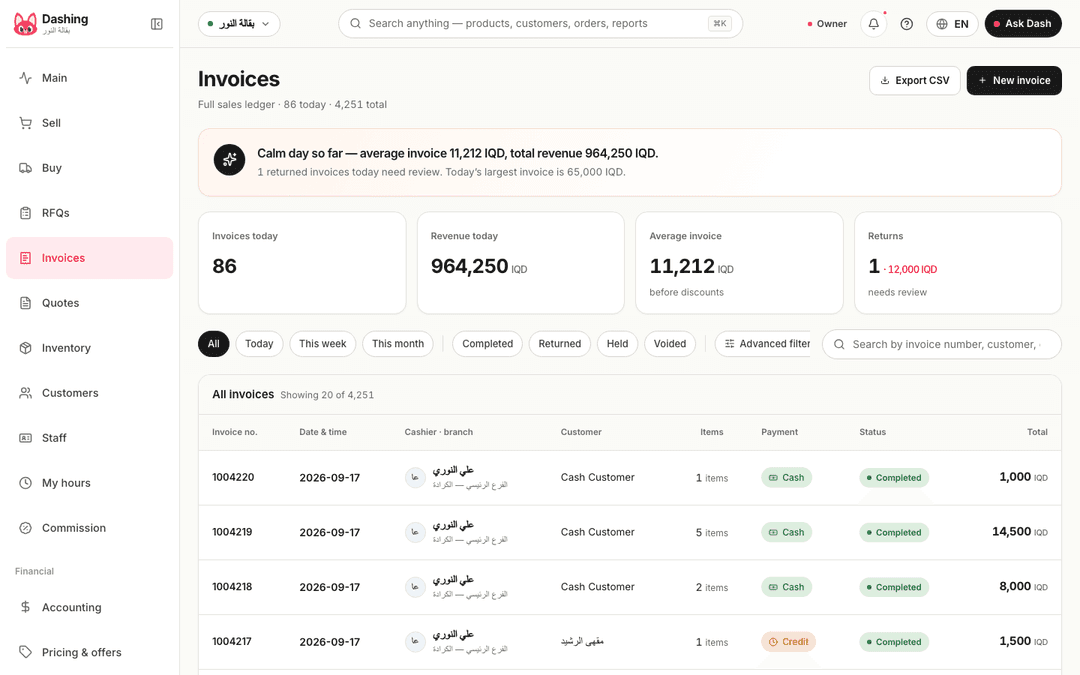
You write an invoice, cash or on credit, on your device even when the internet is down, and WhatsApp opens with a ready message and the receipt link for you to send with a tap. You need no accountant and no training, because the invoice posts to the books and to the customer's account the moment it is confirmed, and a quote becomes an invoice without retyping the lines. The receipt and the PDF come in Arabic, Kurdish or English.
What you do on day one
- Ring up your first sale in "Sell", cash or on credit, and open it from "Invoices".
- In "Quotes" tap "New quote" and enter one customer's items.
- When they agree, turn the quote into an invoice with a tap.
- From the invoice page open WhatsApp or download the PDF, and try printing at 80 mm or A4.
Invoices at the sample shop
At the sample shop Corner Market, 4,200 invoices were written in 60 days. 49 of them were returned, each return a reversing entry tied to its original invoice, so a correction made after confirmation stays visible in the record.
From quote to invoice
A quote is saved against the customer. It can be priced in dollars at a rate you type; the invoice is then booked in the shop's currency at that rate, and the exchange difference is recorded when the customer pays.
The receipt and the invoice on WhatsApp
The message names the shop and the total and carries a link valid for a year. The paper receipt and the PDF carry a QR code that opens the same page. It prints as an 80 mm receipt or an A4 invoice, and the PDF downloads in the language of whoever downloads it.
Try Dashing in your shop, free, no card.
Start freeWhen a sale changes
A return puts the items back in stock and reverses exactly what the sale booked; an exchange takes an item back and sells another in one step. A credit or debit note is tied to its original invoice and adjusts the customer's balance.
Editing an invoice after the sale
A confirmed invoice changes through a revision that is recorded: you remove units, reprice a line or add a line. Dashing posts one entry for the difference, then you settle it with the customer: refund them, leave it as credit on their account, or collect. The invoice's history shows every edit, payment and return in order.
Delivery orders
If you switch delivery on in the settings, the invoice moves forward stage by stage with a tap, you record the delivery company, tracking number and fee, and your staff notify the customer with a WhatsApp message they send themselves. The customer pays the delivery fee to the company on receipt; it is not on the shop's account. Delivery is optional, per shop.
Also on the invoice
- A discount on a line or on the whole invoice, as an amount or a percentage
- An installment plan on the invoice itself, each installment tracked on it
- A recurring sale for a standing order that invoices itself on schedule and posts to the customer's account
- VAT is off by default and switched on with tax codes and rates when it applies; its return comes from the books
- Unlimited sales on both plans, with an upgrade card after the 10th sale in 24 hours on the free one
What it does not do
There is no link to a government e-invoicing system (Iraq, where we started, has none), and no automatic payment reminder: your staff send the invoice and the statement with a tap.
Common questions
Do invoices work without internet?
Yes. The invoice is written and printed on the device, waits until the connection returns and then uploads once: its own reference number stops it being recorded twice if it is sent again.
How do I send the invoice to the customer?
From the invoice page: a WhatsApp message with a link to the receipt, valid for a year, or a PDF you save and send yourself.
Is it an e-invoice registered with the tax authority?
No. Dashing does not link to a government e-invoicing system (and Iraq, where we started, has none today). The invoice is a sales record in your books, and VAT can be switched on with tax codes and rates when it applies.
How many invoices can I write for free?
There is no limit on either plan. On the free plan a sale is never blocked; after 10 sales in 24 hours each sale ends with an upgrade card you can close after a few seconds.
From the blog
- Customer debts: collecting them over WhatsApp without awkwardnessRunning credit sales in a shop: a credit limit per customer, debt aging, a statement that reaches the customer on WhatsApp, and the overdue card every morning.
- Why there is no e-invoicing in Iraq, and what a shop should do insteadTaxes on a shop's sales in Iraq as of September 2026: no VAT, a selective sales tax, no e-invoicing, and what a cashier system should give you when the rules change.
Related
Try it in your shop, free, no card.
The free plan includes an offline cashier with stock, debts and accounting, and it stays free forever. What it includes