For pharmacies: alerts before expiry and low stock, permissions for staff, and a backup every night.
Dashing is for a retail pharmacy that sells over the counter: every delivery is a batch with its expiry date, the nearest expiry sells first, home-screen alerts come before stock expires and when an item runs low, permissions set what each employee can see, and a backup is taken every night; it is not a clinical system, with no drug database and no prescriptions. Free, and it stays free. Every sale, payment and return posts to the books by itself, so you can run the shop without an accountant. It works in Arabic, Kurdish and English and in seventeen currencies, and the cashier keeps selling when the internet cuts.
Your first day
A new shop opens on the till. Type what the customer paid and press Charge for your first sale, or type a product name and price right there and press Add to sale. Then add the medicines you sell most in the first-products screen, a pack of paracetamol and a cough syrup for example, with name, price and quantity, and switch batches on so each delivery is recorded with its expiry date. After a sale, press Receipt on WhatsApp: WhatsApp opens with a link to the receipt, and nothing is sent until you tap send. For a regular who takes monthly medicines and settles at the end of the month, pick Credit, choose the customer or add them by name and phone, and say when they pay; the invoice is booked as a debt on their account.
The shelf that expires
Every delivery from a supplier is recorded as a batch with its expiry date. At the sale the till suggests the batch closest to expiry, and an expired one is flagged and can only be sold with an explicit confirmation, recorded under the name of whoever gave it. Dash flags on the home screen the quantities that will expire before they sell, and the near-expiry window is 30 days by default and can be changed in Settings.
Counting, paying and who can do what
- A minimum per item: the low-stock list, a home-screen card, and a draft purchase order from the suggestion in one tap
- Buying from a supplier in dollars: you type the cost in dollars, enter the rate when you receive, and the stock and the books are booked in your shop currency, with the selling price staying in your shop currency
- Permissions per employee: switch off the inventory, reports or settings screen for anyone; a return without a receipt and an override of the discount cap are written to the activity log under the name of whoever did it
- A backup every night, and a full export of the shop's data in one file from Settings whenever you like
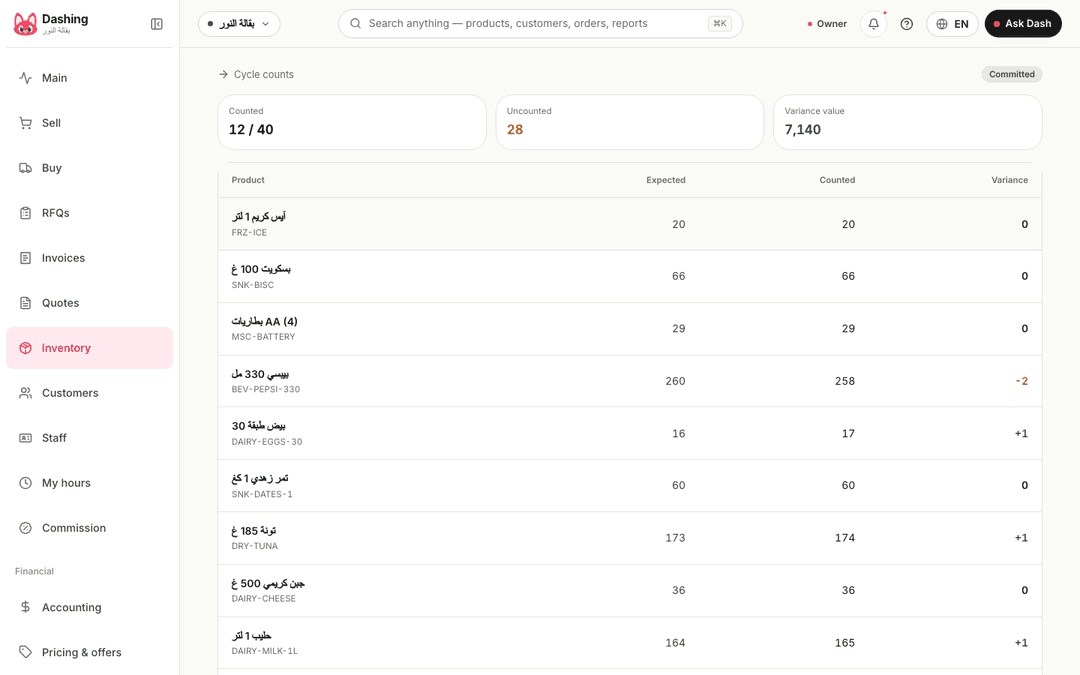
- A cycle count counts the shelf item by item while selling continues; the difference is posted on approval, and each count is opened for one branch
- Quote requests to several suppliers compared side by side, and a scorecard per supplier: on-time percentage and fill percentage
- Partial receiving of a purchase order, with the payable booked for what arrived
- Payables aging at 30, 60 and 90 days, and the list of what is due this week
- The cashier works offline; sales are saved on the device and uploaded when the connection returns
What it does not do
Not a pharmacy management system: no drug database, no prescriptions and no reporting to the Ministry of Health or the syndicate.
Common questions
Does it suit a pharmacy with two branches?
Yes: each branch keeps its own stock and batches and its own drawer; transfers move stock between branches, and profit is shown per branch.
Does it block the sale of an expired medicine?
It flags the medicine and asks for an explicit confirmation, recorded under the name of whoever gave it; there is no hard block.
Does the cashier work during an internet outage?
Yes; sales are saved on the device and uploaded automatically, each with its own reference number. What needs a connection: the financial reports and Dash.
From the blog
- How to open a pharmacy: steps, costs, stock, expiry datesHow to open a pharmacy: the steps, what drives each cost, choosing first stock, pricing and margin, expiry control, a daily routine, mistakes and a checklist.
- Cashier software in Kurdish (Sorani): what exists and what to checkFor shops in Erbil, Sulaymaniyah and Duhok: what 'Kurdish support' really means in cashier software, a checklist to tick, and what to test before you pay.
Related
Try it in your shop, free, no card.
The free plan includes an offline cashier with stock, debts and accounting, and it stays free forever. What it includes