Dash answers your questions from your shop's numbers, suggests changes, and does nothing until you approve.
Type a question about your shop in plain words, such as "how much did I sell yesterday?" or "who hasn't paid in a month?", and Dash answers with the figure and its source from your own books. You need no training and no accountant: Dash changes nothing until you tap Approve on a card showing the old and the new value. It answers in Arabic, Kurdish or English, following the interface language, and it needs an internet connection.
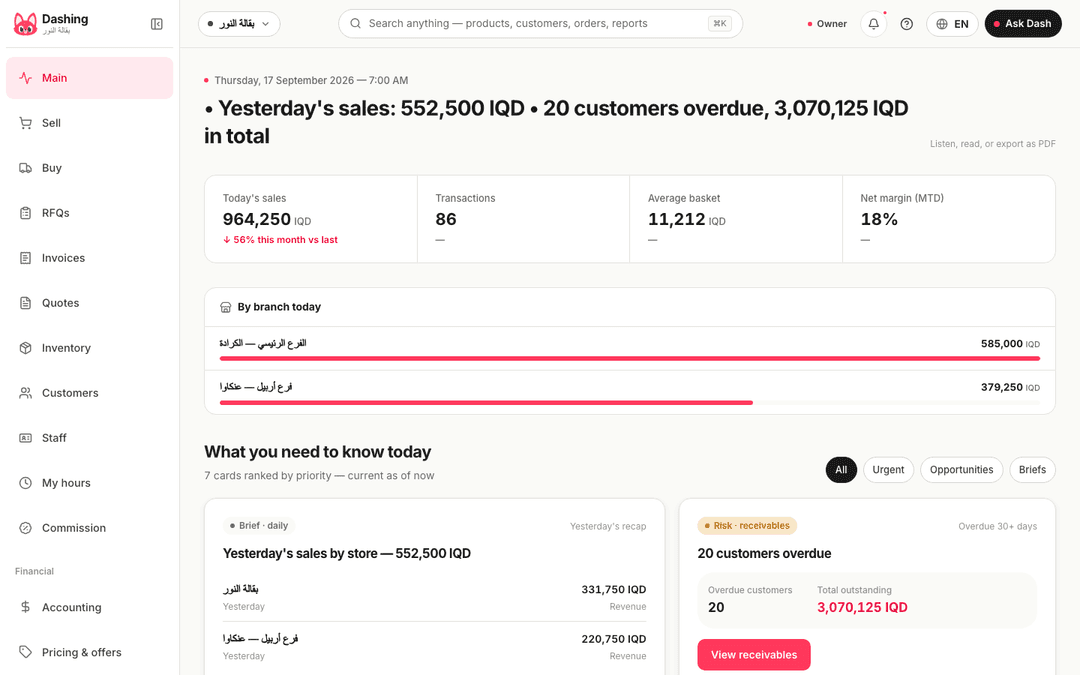
Watch it work
What you do on day one
- Open Dash and ask one question about yesterday's sales.
- Type a customer's name to see their balance and oldest unpaid invoice, or an item's name to see its stock in every branch.
- Ask for a price change, and read the old and new value on the card before you tap Approve or cancel.
What Dash does not do
- It does not invent numbers: when the data is not there, it says so
- It does not make changes on its own: every write goes through an approval card that records who approved it
- It does not see what the user cannot see: screen permissions apply to its tools too
- It does not send out personal data: phone numbers, emails and card-like numbers are masked before any request reaches the model
- It does not work offline
What it answers
"How much did I sell yesterday?" "Who hasn't paid in a month?" "What is about to run out?" "Why did the margin drop this month?" For each question, a tool reads the answer from your books and returns it with the figure and its source. Type a customer's name and Dash shows their balance and oldest unpaid invoice; type an item and it gives the stock in every branch and its movements. Ask "who should I collect from first?" and it ranks overdue customers by which payments would close the projected cash gap over the next 14 days, showing each customer's amount, days overdue and past payment record; when the projection is healthy, it says no urgent collection is needed. Answers arrive in the chat inside the app, and the conversation history is kept.
What it proposes on a card
A price change, a customer payment, a stock adjustment. Dash shows the old and new values on a card with an Approve button and a Cancel button. On approval, the change runs through the same tools the screens use and is written to the audit log with your name and the time. Without approval nothing happens, however many times the request is repeated.
Try Dashing in your shop, free, no card.
Start freeUndo what Dash did
Every change you approved appears in the Dash actions history, with an Undo button where undoing is possible. Where it is not, the page gives the reason instead of the button.
Why is this figure what it is?
Beside the figures in the reports sits a "Why?" icon, shown on hover and always visible on touch. Tap it and Dash opens a question about that very figure and explains where it came from.
Tell me when
You put a watch on a figure and a limit, and Dash rings the bell on the home screen when it crosses: what a customer owes, how many days late they are, how much of an item is left in stock, an item's profit margin, today's sales, or how many days your cash will last.
Dash on the home screen
The home screen is Dash: a short list of what needs you today, such as customers who are late and what they owe, and items about to run out, each with a button to the screen where you act on it, plus a box to ask in your own words. Dash writes the list from your numbers, so it needs a connection to reach you.
What it does not do
Dash reads, suggests and explains; it does not act without your approval, does not work offline, and sees no more than your permissions allow. It can misunderstand a question, but it never invents a number.
Common questions
Does Dash make mistakes?
It can misunderstand a question, but it does not invent a number and changes nothing on its own: every figure comes from a tool that read your data, and every change waits for your approval.
Does it work in Kurdish?
Yes. It answers in the interface language you choose: Arabic, Sorani Kurdish or English.
Where is my data processed?
Your data stays in Dashing; only the question and the context it needs are sent to the model that writes the answer, after phone numbers, emails and card-like numbers are masked, and every request is written to its own log. Details on the security page.
What happens when I run out of messages?
The message box pauses and shows when messages come back. The cap is 50 free messages and then 3 a week on the free plan, and 40 a day on the yearly plan.
From the blog
Related
Try it in your shop, free, no card.
The free plan includes an offline cashier with stock, debts and accounting, and it stays free forever. What it includes