A cashier that sells by barcode, prints an 80 mm receipt, and works offline.
The Dashing cashier runs in the browser on any PC, tablet or phone. It reads from any barcode reader that acts as a keyboard, prints an 80 mm receipt through the browser's print dialog or straight to the receipt printer, and sends the receipt as a WhatsApp link. When the internet drops, sales are saved on the device and uploaded once when it returns.
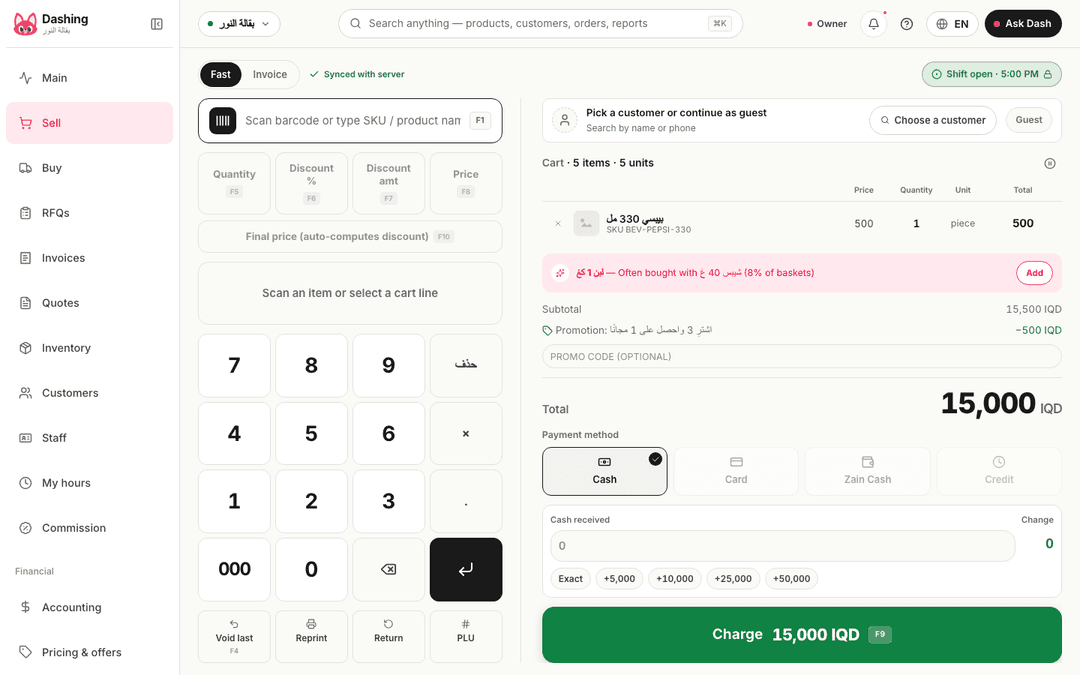
Watch it work
What you need on the counter
A device with a current browser: a Windows PC, a tablet, or an Android or iPhone. A barcode reader of the kind that types what it reads, as if it were a keyboard, over USB or Bluetooth; it needs no driver and no setup inside the software. And a thermal receipt printer with 80 mm or 58 mm paper, printing through the browser's print dialog or direct under the conditions listed below. There is no customer-facing display, and the scale itself is not connected: scan the barcode a price-label scale prints and the item is added at the printed weight, or type the weight in.
What a sale can include
- A barcode scan, or a tap on a product grid with photos and a category filter
- F1 to F5 shortcuts for the most common actions, and a total large enough to read from the other side of the counter
- A discount on the line or on the whole cart, as a percentage or an amount
- Fractional quantities, and a barcode per unit: the case of water with its barcode and the single bottle with its own, with stock deducted in the base unit
- For dated stock: a batch picker at the sale that suggests the nearest expiry; an expired batch is flagged and can only be sold with an explicit, recorded confirmation
- Hold the sale while the customer goes for cash, and finish it afterwards
- Once a customer is selected, their price list and default discount apply automatically, loyalty points are earned, and a gift card can be redeemed inside the cart
- A credit sale posts to the customer's account; anyone over their credit limit is stopped, and whoever overrides it with the permission has their name and reason logged
The receipt
An 80 mm receipt with the shop's logo, address and phone, in Arabic, Kurdish or English according to the language of whoever prints it. From the invoice page you print an A4 copy or download a PDF. The WhatsApp button opens the chat with a link to the receipt page that stays valid for a year; no file is attached. The printed receipt and the PDF carry a QR to the same page, and the invoice shows when the customer opened it. A reprint is counted and written to the audit log under the name of whoever printed it; nothing is stamped on the copy.
Direct printing and the cash drawer
In the receipt settings each device picks how it prints. Direct printing is faster, asks nothing, and opens the cash drawer plugged into the printer on every cash sale. Its conditions: Chrome or Edge, and a USB printer on an Android tablet, a Mac or a Chromebook, or a printer on a COM port. On a Windows PC, Windows runs a USB printer itself, so it prints through the print dialog. Network and Bluetooth printers print through the dialog too, and the print dialog cannot open the drawer.
Dollars at the till, change in dinar
When the shop accepts dollars, the customer pays all or part of a cash sale in dollars, and the change goes back in dinar or in dollars, as you choose. The cashier asks for the exchange rate once on first use on the device and it can be changed with a tap; one rate per currency covers the sale.
A customer asks: how much is this?
Open the price check and scan the item: its price and the quantity on the shelf show without it being added to the cart, so there is no removed-line trail left behind.
Close the day
From the Today card or the Today line at the till you open the day's summary: its sales split by how they were paid, who paid and who still owes. It is read-only and needs no shift, so you can check it against your paper notebook, and it can be sent on WhatsApp.
Returns
With or without a receipt, refunded in cash or as a balance on the customer's account. A return without a receipt needs a permission and is logged under the name of whoever allowed it.
Ways to pay
Cash with the change worked out, or card recorded as its own payment method, or on credit to the customer's account. A wallet payment, such as a mobile wallet, at the fast cashier is booked as cash; the separate "transfer / wallet" line exists on the invoice screen when a payment is split. Dashing does not process payments and takes no commission: the card or wallet terminal stays the bank's.
Try Dashing in your shop, free, no card.
Start freeDoes the cashier record mobile wallet payments?
Yes. You pick the payment method when you take the money. At the fast cashier a mobile wallet payment is booked as cash, and a card as a bank collection. To keep a wallet apart, use invoice mode with a split payment. Dashing does not process the payment or check that the money arrived.
How do I close the shift at the end of the day?
You close the shift and enter the counted cash. Dashing works out the difference from the expected amount and books it automatically as an overage or a shortage. If the device is offline, closing waits until its sales have uploaded. Every movement during the shift, whether a deposit, a withdrawal or an expense, is recorded under the name of whoever made it.
When the internet drops
Every sale is saved first on the till's own device, then uploaded when a connection is available. Each sale has its own reference number, so it is never recorded twice however many times the upload is retried, and closing a shift waits until everything on the device has uploaded. If Dashing does not accept a sale when it goes up, it goes to the recovery drawer with the reason. A new shop allows selling below zero by default; in a shop that turns it off, the fast cashier refuses a line above the branch's stock at scan time, names the quantity on hand, and an owner or manager can allow that one sale.
Can I scan barcodes with a phone camera?
Yes. On any device with a camera, a camera button appears beside the scan field and reads barcodes with the back camera: six formats: EAN-13, EAN-8, UPC, Code 128, Code 39, plus QR. Chrome on Android and on Mac reads with the browser's own detector, so nothing downloads. On iPhone and in Chrome on Windows a small reader downloads from our own site once, the first time the camera opens, and that first time needs a connection. If the camera is blocked in the browser settings, type the code into the field or use a barcode reader.
Which devices does it run on?
Any device with a current browser: an ordinary Windows PC, a tablet or a phone. There is no installer and no desktop version; you open the site and sign in. It can be installed as an app from the browser where the browser offers that, and on iPhone through the Safari steps. Each cashier has their own account, and the number of users is not limited.
How does a sale handle stock and customer debts?
Every sale deducts from the branch's stock on the device at that moment, in base units, even with no internet. When you sell on credit, the amount posts to the customer's account. A customer over their credit limit is stopped until a staff member with the permission allows it and enters a reason. From the customer's page you send their statement as a WhatsApp link that works for 30 days.
What does the free plan include, and what does the yearly plan add?
The free plan is the whole shop for one branch: the offline cashier with stock and invoices, customer debts, accounting, plus an unlimited number of users, with no expiry date. Sales and customers are unlimited, never blocked. After 10 sales in 24 hours, each sale ends with an upgrade card; you can close it after a few seconds. It counts 10 expenses and 10 purchase orders every 24 hours. The yearly plan adds three things: a second branch, Dash at 40 messages a day instead of 3 a week, and priority WhatsApp replies. You need no card to sign up.
How long does setup take?
Nothing to install: you sign up in the browser and add your products. Type your products with their prices, scan a barcode to add one, or upload an Excel or CSV file using a ready template you download; in a sample import, 500 items with opening stock import in well under a minute. The total time depends on how many items you have, and we do not promise a set hour. The yearly plan includes a 30-minute setup session on screen.
Which languages does the interface use?
Arabic, Sorani Kurdish or English, chosen by each user, and right-to-left layout is supported. The receipt prints in the interface language of whoever prints it.
What it does not do
No connection to the scale itself (it reads the barcode on the label the scale prints, otherwise the weight is typed), no customer-facing display, and no tables or kitchen screen for restaurants. By default a shop can sell an item with zero stock; if it turns that off, the cashier refuses the item at scan time.
Common questions
Does the cashier work without internet?
Yes. Every sale is saved on the device and uploaded automatically when the connection returns, and each sale has its own reference number so none is recorded twice. What needs a connection: the financial reports and Dash.
Which barcode reader do I need?
Any reader that acts as a keyboard, which is the common kind, over USB or Bluetooth. No driver and no setup. We do not recommend specific models.
Does it print to a thermal printer?
Yes. A receipt on 80 mm or 58 mm paper, with the shop's logo, address and phone, in Arabic, Kurdish or English: through the browser's print dialog on any printer, or straight to a USB or COM-port printer with no dialog in Chrome or Edge, which also opens the cash drawer on a cash sale. On Windows a USB printer prints through the print dialog.
Can a customer buy on credit?
Yes. The sale posts to the customer's account, and you can set a credit limit; going over it needs a permission and is logged with the name and reason of whoever allowed it.
What happens when a receipt is reprinted?
Each reprint is counted on the invoice and written to the audit log with who printed it and when, so the owner can see who reprints often. Nothing is stamped on the copy.
What happens to sales made offline when the internet comes back?
They upload automatically in batches. Each sale has its own reference number, so none is recorded twice however often the upload is retried, and a shift cannot close until everything on the device has uploaded. If Dashing does not accept a sale because of something in it, such as an item with zero stock in a shop that does not allow negative stock, it goes to the recovery drawer with the reason for the owner to decide.
Does it read barcodes with a phone camera?
Yes. A camera button sits beside the scan field on any device with a camera and reads the common retail formats and QR. On iPhone and in Chrome on Windows a small reader downloads once, the first time you use it.
Does it run on a Windows PC and on a phone?
Yes. It runs in the browser on Windows PCs and tablets as well as Android phones and iPhones, with no installer, and it can be installed as an app from the browser.
Is the cashier program free, and what does the paid plan add?
Yes. The free plan covers one branch and includes stock and accounting, with unlimited sales and customers (upgrade card after the 10th sale in 24 hours), 10 expenses and 10 purchase orders every 24 hours. The yearly plan adds a second branch, Dash at 40 messages a day, and priority WhatsApp replies.
Can I bring my product list from Excel?
Yes, from a CSV file: the code, name and sale price are required, while cost and quantity are optional, as is the barcode; the quantity posts as opening stock. A dry run checks the file before anything is created, and in a sample import 500 items import in well under a minute.
Does it come in Arabic and Kurdish?
Yes: the interface comes in Arabic and in English, and in Sorani Kurdish too; each user chooses.
From the blog
- How to open a supermarket or mini-market: steps, costs, stockA practical guide to opening a supermarket or mini-market: the steps, what drives each cost, choosing first stock, pricing, a daily routine and a checklist.
- Free cashier software for shops: what 'free' means (Oct 2026)How to judge free cashier software: caps, trials that end, paid add-ons, and what Dashing's free plan includes, with no expiry date.
- An accounts program for a shop: what you need, and what is sold to youWhat an accounts program must do for a shop: real profit, debts by name and age, the drawer, books the accountant can open. And what is sold to you, unneeded.
- Accepting Zain Cash, Qi Card and FIB at the counter: fees and bookingAccepting e-payments in an Iraqi shop: the merchant fees Zain Cash publishes, what Qi Card, FIB, SuperQi and AsiaHawala do not, and how each payment is booked in Dashing.
Related
Try it in your shop, free, no card.
The free plan includes an offline cashier with stock, debts and accounting, and it stays free forever. What it includes