Clothing shop software: one shirt in its sizes and colors, returns and exchanges, offers with dates.
Dashing is clothing shop software: a cashier, accounts and stock in one place. One shirt comes in many sizes and colors (variants): each size and color is its own item with a barcode and its own stock in every branch, returns and exchanges work with or without the receipt, and offers run between two dates. Free, and it stays free. Every sale, payment and return posts to the books by itself, so you can run the shop without an accountant. It works in Arabic, Kurdish and English and in seventeen currencies, and the cashier keeps selling when the internet cuts.
Your first day
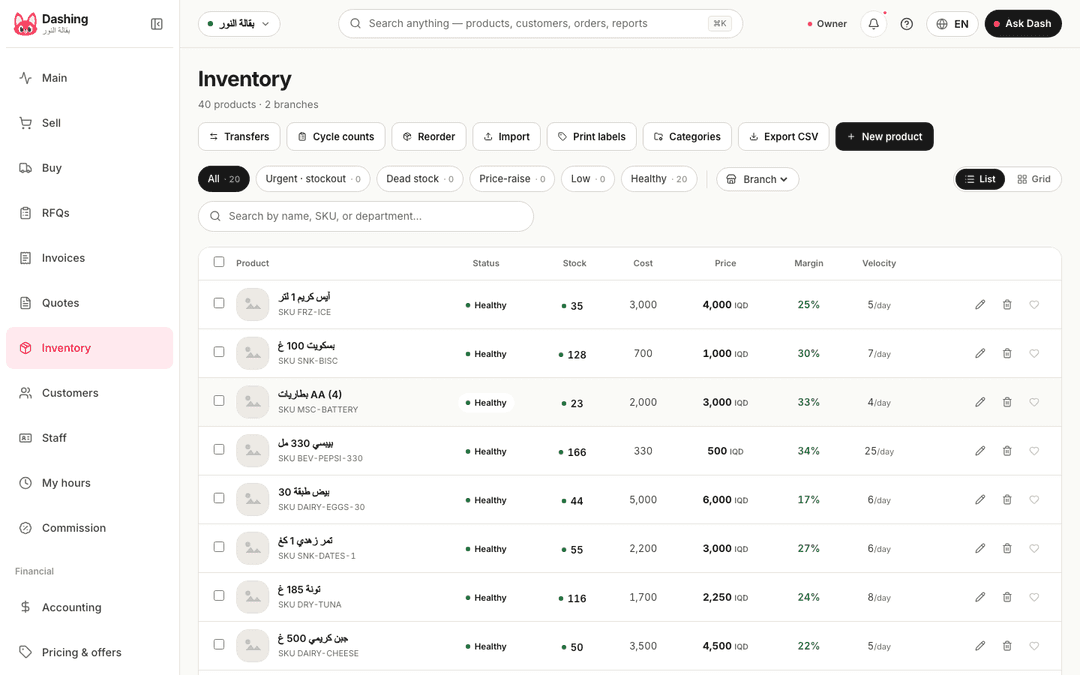
A new shop opens on the till. Type what the customer paid and press Charge for your first sale, or type a product name and price right there and press Add to sale. Then in Inventory create the shirt as a parent product and enter its first variants, blue medium for one, with code, price and quantity, and sell the next piece by scanning the barcode of blue medium. After a sale, press Receipt on WhatsApp: WhatsApp opens with a link to the receipt, and nothing is sent until you tap send. For a regular who takes a jacket and pays at the end of the month, pick Credit, choose the customer or add them by name and phone, and say when they pay; the invoice is booked as a debt on their account.
A shirt in five sizes and three colors
You create the parent once, then enter the variants one row at a time: name, code, price and opening quantity, fifteen rows for this shirt. There is no tool that generates the variants from a table of sizes and colors. At the till each variant sells as its own item by its barcode or from the grid with its photo, and stock is deducted from that size in that branch. The item page shows stock per branch, and a transfer between branches is suggested automatically when a size runs out in one branch and sits unsold in another.
When the customer comes back
- A return with a receipt is made from the invoice itself, refunded in cash or as a balance on the customer's account
- A return without a receipt: the cashier picks the item and its sold price, the software lists the matching sales within 90 days (the window can be changed in Settings; zero switches the feature off), and the choice is written to the audit log under the cashier's name
- An exchange in one transaction: the piece comes back, the replacement is rung up, and only the difference is settled
- An offer as a percentage or an amount off the cart, or buy 2 get 1, with a start and end date and a minimum cart if you want one
- A gift card with a balance, and loyalty points earned and redeemed inside the cart
What it does not do
No online storefront and no Instagram integration; sales are in the shop and by invoice. No variant generator from a size-and-color table and no variant picker at the till: each variant is an item with its own barcode.
Common questions
How do I enter a shirt in five sizes and three colors?
One parent product, then 15 rows, each with a name, a code, a price and an opening quantity, and a barcode per variant. Nothing is generated from a table.
Does an exchange need the receipt?
No. With the receipt it is made from the invoice; without it the cashier picks the item and its price, the software lists the matching sales within the window set in Settings (90 days by default), and the choice is logged under their name.
Do seasonal offers apply on their own?
Yes. Between its start and end dates the offer applies to the cart at the till, and it can be limited to a customer group or a minimum cart.
From the blog
Related
Try it in your shop, free, no card.
The free plan includes an offline cashier with stock, debts and accounting, and it stays free forever. What it includes