Double-entry accounting for shops: every sale posts its own entry, and your accountant finds complete books.
You sell and the books write themselves: everything you sell, buy or spend posts its own entry the moment it happens, so at month end you open the income statement and your profit is already there. All of it is on the free plan. You can run it without an accountant or any training, because the money screen is written in plain sentences for the owner, and an accountant who joins later finds complete books. The books can be in any of seventeen currencies, and the screens are in Arabic, Kurdish or English.
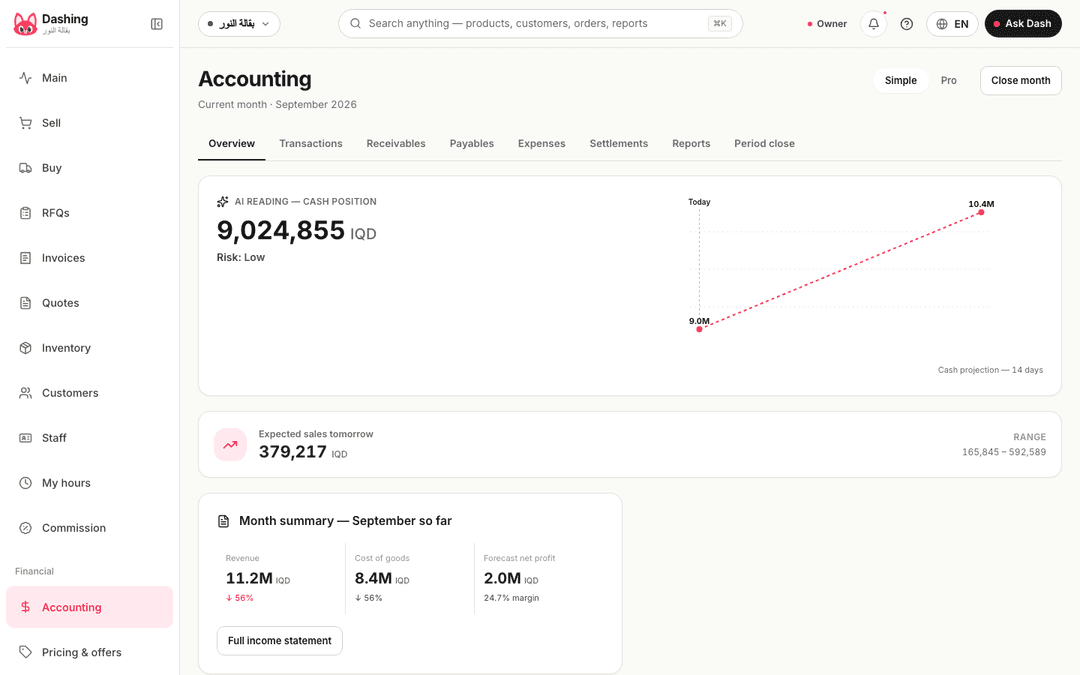
Watch it work
What you do on day one
- At sign-up choose the currency of your books; Dashing suggests your country's, and it is pinned after the first sale.
- Ring up your first sale at the cashier and its entry posts by itself.
- Open "Accounting": the overview shows your cash, with what customers owe beside it.
- Record one expense under "Expenses" with a photo of its receipt.
- If you have an accountant, give them an account under "Staff" with the accountant role.
A month at the sample shop
At the sample shop, Corner Market, revenue for the first half of September came to $17,300, net profit to $2,930, gross margin to 25.2%, cash in the two drawers and the bank to $17,200, and $2,650 was owed to suppliers. Nobody wrote a single entry by hand: 934 invoices posted their entries the moment they were sold, received purchase orders posted the suppliers' entries, and expenses were recorded from a phone with a photo of the receipt.
What is posted automatically
- Sales, returns, purchases, receipts and payments, each as a balanced entry; a return reverses exactly what the original sale posted rather than a freshly computed total
- Expenses from the phone with a photo of the receipt, petty cash and recurring expenses
- Recurring entries such as rent and salaries on a schedule; the amount can be a formula, and an approval can be required before posting
- Sales tax when you switch it on: tax codes and rates per line, and a tax return computed from the books
The reports, by name
Income statement, Balance sheet, Trial balance, Cash flow statement, General ledger, Sales report, Expense report, Inventory report, Customer report, Receivables aging, Payables aging, and the VAT / tax return when tax is switched on. A statement per customer and per supplier. The financial reports need an internet connection; the cashier does not.
Try Dashing in your shop, free, no card.
Start freeThe currency of your books
Seventeen currencies: US dollar, euro, pound sterling, Canadian dollar, Swiss franc, Polish zloty, Swedish krona, Turkish lira, Saudi riyal, UAE dirham, Qatari riyal, Egyptian pound, Moroccan dirham, Israeli shekel, Lebanese pound, Yemeni rial and Iraqi dinar. The one you chose is pinned once the first sale is posted. Where a currency has no small coins (the Iraqi dinar), amounts are whole. With multi-currency switched on in Settings, quotes are priced in another currency at a rate you type, and become invoices in your home currency at that rate; if the customer settles later at a different rate, the difference is booked. No exchange rate is fetched automatically, and a rate older than 7 days is flagged as stale.
When the accountant comes
You give your accountant their own account, limited to the accounting and reports screens; they work from their office in any browser and never see the cashier. They export the journal to Excel, the statements to PDF, and the invoice, customer and item lists to CSV. They post adjusting entries by hand, whether accruals or corrections, with a written reason that stays with the entry, and correct a wrong entry with a reversal dated today. After the review they lock the month so no back-dated entry is accepted, and close the fiscal year with a proper closing entry; each of these actions requires the permission. What they will not find: a link to a tax authority, automatic bank feeds, or a fixed-asset screen; Dashing calculates depreciation, but it has no screen yet, and bank reconciliation is done by manual matching.
Ask Dash about the report
Ask "why did the margin drop this month?" and Dash answers from the report's own numbers, through tools that read your books directly and never invent a figure. It needs an internet connection
What it does not do
No e-invoicing and no tax-authority link (none exists in Iraq, where we started), no automatic bank feeds, no fixed-asset screen, and no multi-company under one account. The financial reports need internet.
Common questions
Do I need an accountant to use it?
No. The money screen is written for the owner, with no jargon. When your accountant comes, the balanced books are complete in the Accounting section: the journal, the trial balance and the statements.
Which currencies can the books use?
Seventeen: US dollar, euro, pound sterling, Canadian dollar, Swiss franc, Polish zloty, Swedish krona, Turkish lira, Saudi riyal, UAE dirham, Qatari riyal, Egyptian pound, Moroccan dirham, Israeli shekel, Lebanese pound, Yemeni rial and Iraqi dinar. You choose one at sign-up, Dashing suggests your country's, and it is pinned once the first sale is posted. Quotes can be priced in another currency at a rate you type and become invoices in your home currency; the cashier is in your home currency.
Can my accountant work from their office?
Yes, with their own account and permissions limited to the accounting and reports screens, from any browser, with everything they do in the audit log.
Can an entry or an invoice be deleted?
Nothing is deleted. An invoice is voided with a visible reversing entry, and the original and the void stay together in the audit log under the name of whoever did it. After a period is closed, no entry dated inside it is accepted.
From the blog
- Free accounting software for shops: real books? (October 2026)How to tell whether free accounting software has double entry, a balance sheet and a month close, and what Dashing's free plan includes.
- An accounts program for a shop: what you need, and what is sold to youWhat an accounts program must do for a shop: real profit, debts by name and age, the drawer, books the accountant can open. And what is sold to you, unneeded.
- Accepting Zain Cash, Qi Card and FIB at the counter: fees and bookingAccepting e-payments in an Iraqi shop: the merchant fees Zain Cash publishes, what Qi Card, FIB, SuperQi and AsiaHawala do not, and how each payment is booked in Dashing.
- How to choose accounting software for a shop in Iraq (2026)What to check before paying for accounting software for an Iraqi shop: double entry, the cashier, the dinar, language, debts, your accountant and the real yearly price.
Related
Try it in your shop, free, no card.
The free plan includes an offline cashier with stock, debts and accounting, and it stays free forever. What it includes