For auto parts: a price per workshop, a credit limit, a quote that becomes an invoice, and receivables by age.
Dashing is for an auto parts shop that sells to workshops and walk-in buyers from one cashier: each workshop has its own price list, credit limit and a statement sent as a WhatsApp link, and a quote becomes an invoice in one tap. Free, and it stays free. Every sale, payment and return posts to the books by itself, so you can run the shop without an accountant. It works in Arabic, Kurdish and English and in seventeen currencies, and the cashier keeps selling when the internet cuts.
Your first day
A new shop opens on the till. Type what the customer paid and press Charge for your first sale, or type a product name and price right there and press Add to sale. Then add the parts you sell most in the first-products screen, front brake pads and an oil filter for example, with name, price and quantity, and sell the first one to a walk-in buyer at the shelf price. After a sale, press Receipt on WhatsApp: WhatsApp opens with a link to the receipt, and nothing is sent until you tap send. For the first workshop, add it as a customer, set its price list and credit limit, pick it at the cashier with F2 and sell on Credit; its prices show on screen and the invoice is booked as a debt on its account.
The workshop at the counter
When the cashier selects the workshop at the till (F2), every line in the cart is repriced from its list at once, so the special price is on screen before anything is quoted or collected; the cashier can still change any line afterwards, and what is on screen is what gets booked. A default discount per customer applies alongside the list. The credit limit stops the sale when exceeded; a staff member with the permission enters a reason and continues, and their name, the reason and the amount are written to the audit log.
Receivables and suppliers
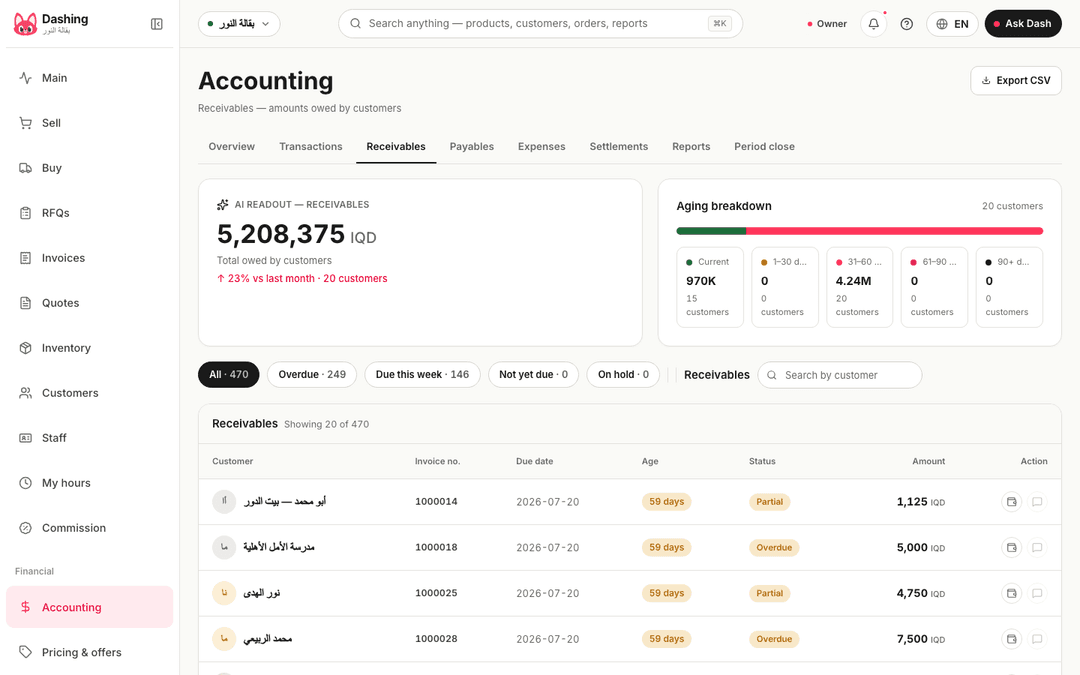
- Receivables aging per workshop: current, then 30, 60 and 90 days and over; a payment is allocated to the oldest invoices first
- The statement is a WhatsApp link valid for 30 days, sent from the customer's page in one tap, with no file attached
- A quote with a validity date that becomes an invoice in one tap, and can be priced in dollars
- Quote requests to several suppliers compared side by side, and a purchase order received in parts
- Units (box / piece) with a barcode each, and variants (left / right, front / rear), each with its own barcode
What it does not do
No cross-reference catalog by car model; items are defined the way you name them, and a part number is searchable only if you put it in the code or the name.
Common questions
Are workshop prices applied automatically?
Yes. When you select the workshop at the till, the cart is repriced from its list and its discount applies, all on screen before you collect payment.
How does the workshop get its statement?
From the customer's page, a button opens WhatsApp with a message containing the statement link: invoices, payments and balance. The link works for 30 days.
Related
- Debt bookDebt book app for shops: due dates, WhatsApp
- InvoicingInvoicing software for shops: invoices and quotes
- Purchasing and suppliersPurchasing and suppliers: orders and receiving
- InventoryInventory software for shops: branches and expiry
- Profit margin calculatorProfit margin calculator: margin, markup and the price for a target
Try it in your shop, free, no card.
The free plan includes an offline cashier with stock, debts and accounting, and it stays free forever. What it includes