Cashier software in Iraq: a buyer's guide for shops (2026)
What to look for in cashier software in Iraq: working offline, dinar and dollar, debts, card and wallet payments, stock, cost, and questions to ask any vendor.
The Dashing teamUpdated 16 min read
This guide is for a shop owner in Iraq who is choosing cashier software for the first time, or replacing what the shop has. It assumes nothing about accounting. Its author is the Dashing (داشنك) team, an Iraqi cashier and accounting system; where we mention our own product we say so, and where something else fits better we say that too. Every number carries a source and a date at the end, and the page is refreshed monthly (last refresh: 16 September 2026).
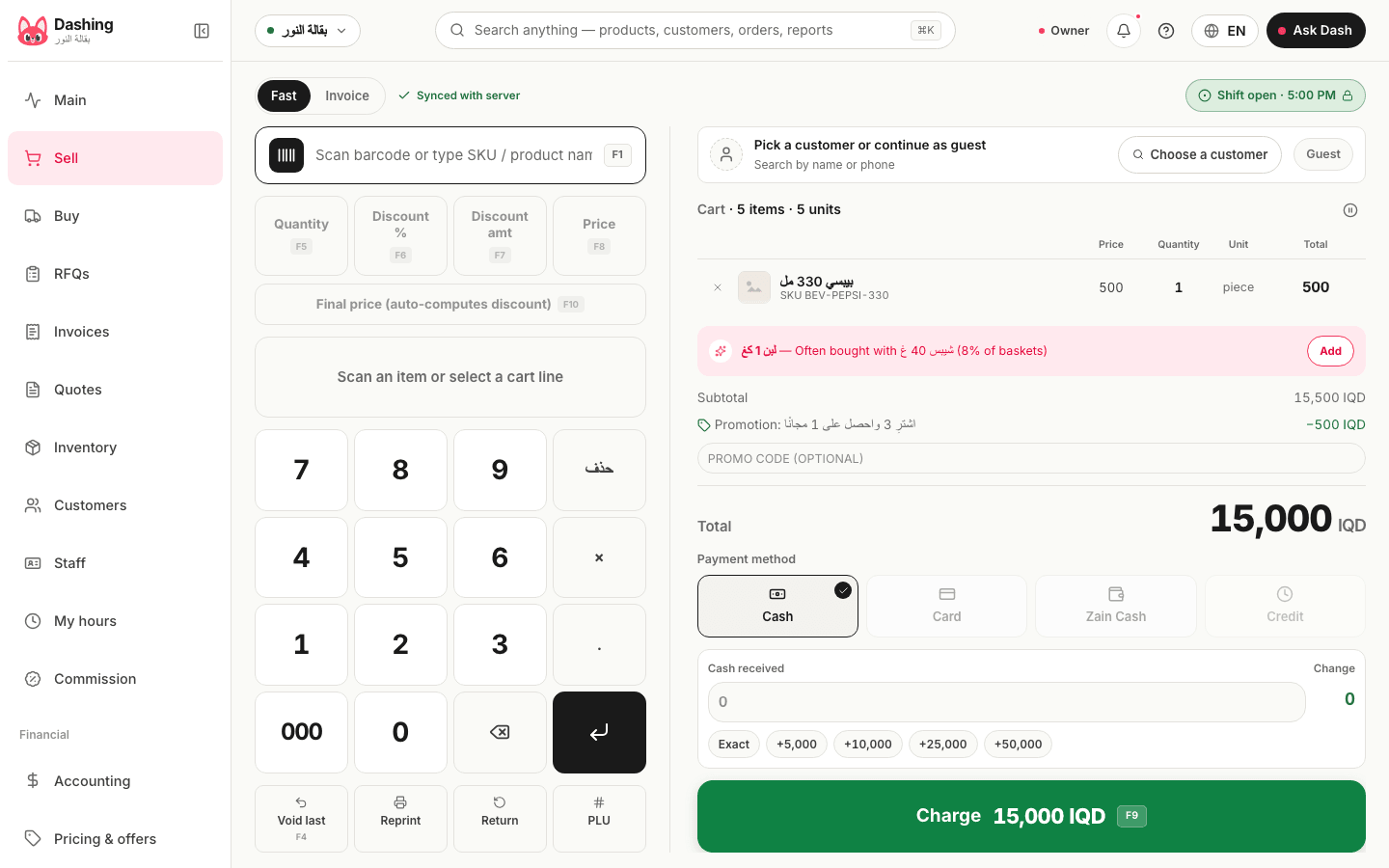
What cashier software is, and what Iraq adds to the definition
Cashier software (point of sale, POS) is the system a sale is recorded on: scan the item, apply a discount, take the payment, print the receipt. That definition holds in any country. What differs in Iraq are eight conditions that turn a program which works fine in Dubai or Cairo into a burden in Baghdad or Erbil.
It has to keep selling when the internet drops, because here the outage is scheduled rather than accidental. It has to understand whole dinars, in practice multiples of 250, and price in dollars when a customer asks in dollars. It has to handle credit, because selling on credit is how shops work and the debt notebook is the oldest software in the country. It has to take cash, card and wallet on the same sale, since Zain Cash and Qi Card are part of the day now. It has to work in Arabic first and in Kurdish where needed, without reading like a translated manual. It has to compute real profit from cost of goods, expenses and debts rather than list sales. It has to control staff and the drawer with permissions, shifts, counts and a log nobody can erase. And it has to run on what the shop already owns: a PC or a phone with a browser, a barcode scanner, a thermal printer.
The rest of this guide takes those eight one at a time.
Hardware you already own, and what the rest costs
Most shops already own half of it. The device is any laptop, tablet or Android phone with a current browser; a dedicated counter tablet sells locally for roughly 150,000 to 400,000 IQD (September 2026, ask two shops before you buy). A barcode scanner of the keyboard-wedge kind, the one that types the code into whichever field is active, costs 25,000 to 80,000 IQD over USB or Bluetooth and needs no driver. An 80 mm thermal printer costs 70,000 to 200,000 IQD, and any printer the operating system can print to works with a browser-based system. A cash drawer is optional, opened by the printer, 50,000 to 120,000 IQD. The network is ordinary Wi-Fi, with no extra computer in the shop if the till keeps working without internet (next section).
A system that requires a "special terminal" or an "installation visit" adds hundreds of dollars and ties you to one technician. Prefer one that runs in the browser. Dashing does, and installs as an app from the browser on a phone or a PC.
Offline is the condition that decides the rest
Iraq's Ministry of Communications orders the internet cut nationwide during school exams every year; Internet Society Pulse counted more than 80 shutdowns in the two years to May 2025, typically from 06:00 to 08:00 on exam days, with a second wave in late August and September. Add the daily power and line cuts.
"Works offline" on the box can mean three different things. Cloud-only: the sell screen stops when the network is gone, even if the menu still looks alive. Computer in the shop: a PC in the shop holds all the records, so the shop works without internet, but the whole record sits on one disk and a second branch is an island. Works on its own: the till saves every sale on the device itself and uploads it when the network returns, exactly once.
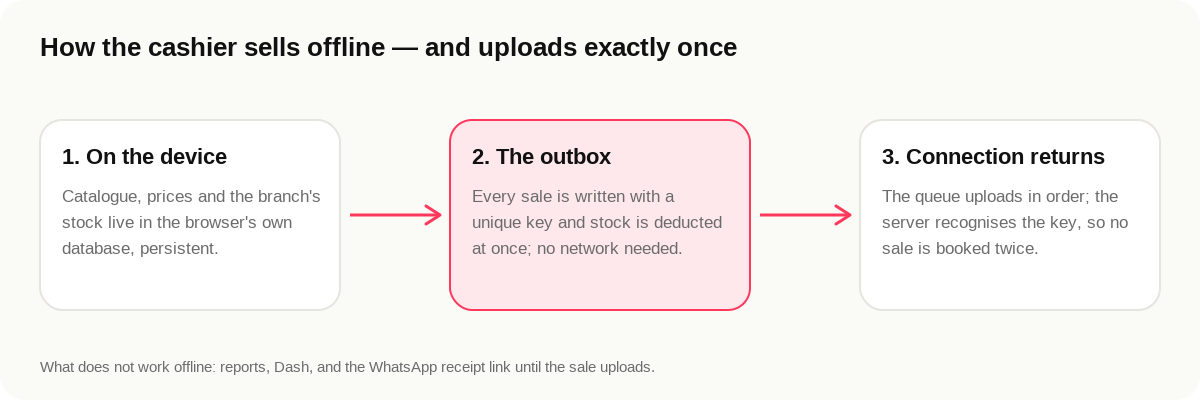
The one-minute test is a single question: "Where is the sale stored while the internet is down, and what happens if the upload is interrupted halfway?" The right answer is "on the device, with its own reference number, so it is never booked twice." Dashing is the third kind; the mechanics and the limits are in how the offline cashier actually works.
What no honest system does offline: the financial reports, the AI assistant, and sending the WhatsApp receipt link before the sale has uploaded. Anyone promising more is selling you a computer to keep in the shop.
Dinar and dollar
Two details expose imported software. The first is decimals: the dinar has no working fractions, and prices are rounded in practice to 250, the smallest note that circulates. A system that shows 2,500.00 and computes to three decimals was built for another market. Dashing keeps the books in whole dinars.
The second is dollars. Electronics, mobile, gold and spare-parts shops quote in dollars and take dinars at the day's rate. The right design keeps the books in dinars and lets you price a quote in dollars at your own rate. In Dashing a quote is priced in dollars at the rate you type (a rate older than 7 days is flagged as stale), and it becomes an invoice in your home currency. The home currency is chosen at sign-up, the dinar for almost every shop in Iraq, and is pinned once the first sale is posted; there are no books in two currencies at once.
Debts, and the statement that reaches the customer
Credit is the rule, and the debt notebook is the oldest ledger in the country. A good system gives each customer a credit limit the cashier cannot exceed (in Dashing, crossing it needs a staff member with the permission and a written reason, both logged). It ages the debt: current, then 30, 60 and 90 days and over. It sends a statement without printing: in Dashing, a WhatsApp link valid for 30 days that shows the customer their invoices, payments and balance. And every morning it tells you how many customers are more than 30 days late and what they owe in total, with the receivables list sortable by amount or by age.
What Dashing does not do here: no automatic reminder messages and no customer self-service portal; a statement is sent with one tap by your staff. Customers and receivables in detail.
Payments: cash, card, Zain Cash, Qi
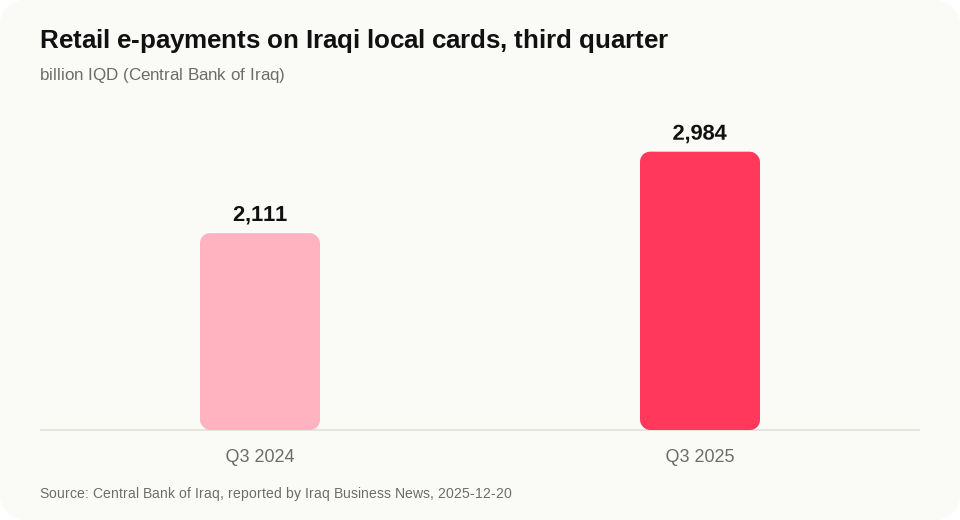
Cash is still the default at the counter, and the numbers are moving. Retail e-payments on local cards reached 2,984 billion IQD in Q3 2025 against 2,111 billion a year earlier (+41%), per the Central Bank of Iraq, and POS devices became mandatory in Iraq's roughly 17,000 pharmacies in January 2025.
The card terminal comes from the bank or from Qi, and a wallet is paid by scanning a code, so "does it integrate with Zain Cash" is the wrong question. The right one is whether the sale is recorded with the right payment method and whether the settlement is booked. In Dashing a fast-POS sale is recorded as cash, card or credit (a wallet payment is booked as cash in that mode), and in invoice mode a payment can be split between cash, card, transfer and gift card. There is no automatic bank connection, because Iraqi banks give outside software no way to read their accounts, and bank reconciliation is done by hand from the statement.
Stock: barcodes, units, batches, branches
Every item has its code, and a carton can carry a different barcode from the piece, so each sells at its own unit and price; stock is always kept in the base unit, whatever the shelf unit is. Batches with expiry dates are for pharmacies, cosmetics and food, and the cashier proposes the batch closest to expiry. Serial numbers and IMEI are for mobile, electronics and gold. With more than one branch, stock is kept per branch, transfers carry a document, and the software proposes a transfer when one branch has surplus and another runs short. A cycle count counts part of the shelves every week instead of closing the shop for an annual count. And the whole catalog comes in from Excel through a CSV file; importing 500 items with their stock takes about 6 seconds (ready templates).
The accounting under the cashier
This is where a "cashier program" and a "shop system" part ways. A program that only records sales does not know your profit; profit needs cost of goods, expenses and debts in one place. The only reliable way to get there is double entry: every transaction is written to two equal accounts, so the books always balance.
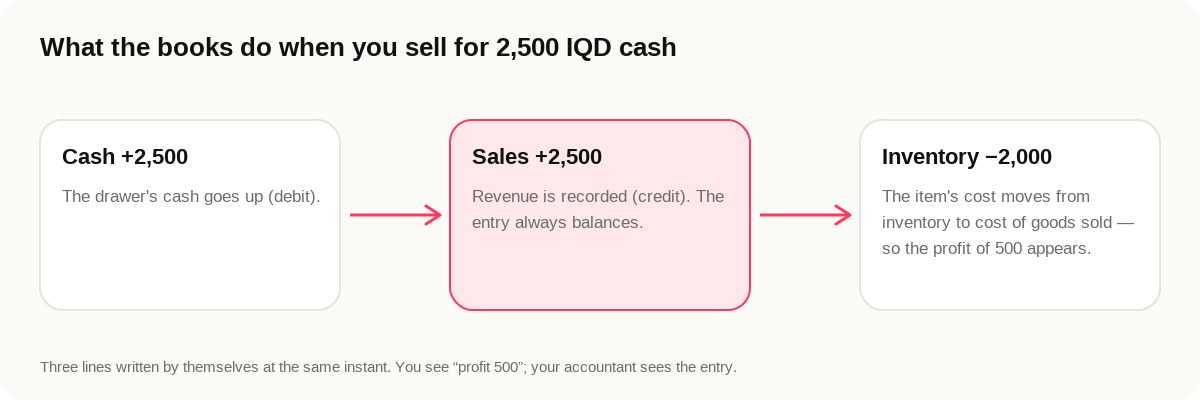
In Dashing this happens under every screen without anyone typing an entry. The owner sees an overview in shop language (cash, receivables, expenses, profit); the accountant opens the full books in the same section: journal, trial balance, income statement, balance sheet, cash flow statement. And because Iraq levies no general VAT and has no e-invoicing today, a system that sells you "electronic tax compliance" here is selling something nobody needs.
Staff and the drawer
Permissions per screen mean the cashier sees the cashier, the accountant sees the books, and you see everything. A shift opens with a float and closes with a count, and the gap between counted and expected is booked. A blind count, when you switch it on in Settings, hides the expected figure from the cashier until the count is entered, and asks for a written reason above the threshold you set. The shift report shows sales by payment method, returns and the variance, and compares the shift with the same weekday a week earlier. And an audit log that can only be appended to keeps every price change, discount and void with a name and a time.
Without those, "is the cashier stealing?" is a question you cannot answer. Staff and shifts in detail.
Languages: Arabic, Kurdish, English
Open the sell screen and the reports before you buy. If the buttons read like a translated manual, your accountant will work in English and your cashier will guess. In Erbil, Sulaymaniyah and Duhok, Kurdish (Sorani) is not optional. Dashing is designed in Arabic first, right to left, and written in Kurdish and English at the same level; every user picks their own language (cashier software in Kurdish).
Shop types, one page each
A grocer and a phone shop need different things from the same system. Grocery and supermarkets: carton and piece, weighed goods, reorder points, fast shifts (details). Pharmacies: batches and expiry, soonest-to-expire first, cycle counts, and the mandatory card terminals (details). Mobile and electronics: IMEI and serials, repair work orders, installments, quotes in dollars (mobile, electronics). Clothing: sizes and colors, returns and exchanges, promotions (details). Gold: selling by weight, dollar and dinar, a number per piece (details). Spare parts: price lists per workshop, credit limits, quotes (details).
What Dashing does not do: restaurants with tables and kitchen screens (cafés and quick-service counters work), e-invoicing, payroll, and online storefronts. All shop types.
What cashier software costs in Iraq, 2026
Prices come in five shapes, and the number on the website is rarely the number on the invoice. For a one-branch shop with two users, per year, from published vendor price pages checked in September 2026:
- A free global POS app with paid add-ons: $0 for the till, up to about $350 a year once you add stock and staff add-ons. No accounting.
- A per-user ERP suite: about $174 in the first year ($7.25 per user per month on the yearly plan), about $215 after that, before any implementation help. Priced in dollars and per user.
- An Arabic cloud accounting service: $240 to $600 a year by plan, one user included, more users priced separately. Priced in dollars.
- A Western accounting app: about $456 a year for the entry plan. Accounting only, with no cashier.
- Dashing: 420,000 IQD a year per shop (about 35,000 a month) for cashier, stock, accounting, debts on WhatsApp, branches and Dash, or a free plan with no card (terms on the pricing page).
The hidden fees (per user, per branch, per transaction, dollar billing, auto-renewal, export charges) are in what cashier software costs in Iraq.
How to choose, in ten questions
- Where is a sale stored while the internet is down?
- Is Arabic native, and is Kurdish available?
- Whole dinars, and dollar pricing when needed?
- Does it run on the devices I have?
- Is there an income statement and a balance sheet from the same data?
- Do customers get a credit limit and a statement that reaches them?
- What does a second branch cost, and is stock per branch?
- Are there per-screen permissions and an audit log?
- Can I export everything to CSV and leave?
- What is the real price after fees, and does it auto-renew?
When Dashing is not the right choice
- Restaurants with table service or a kitchen screen. Dashing has no tables, no modifiers, no KDS. Cafés and quick-service counters work; a sit-down restaurant does not.
- A company that needs e-invoicing with a tax authority (Saudi Arabia, Egypt, Jordan…). Iraq has none today, and Dashing does not implement one.
- A business that wants books in two currencies at once. The books are in one home currency chosen at sign-up (the dinar for almost every shop in Iraq), and it is pinned once the first sale is posted.
A one-page checklist
| Question | Bad sign | Good sign |
|---|---|---|
| Internet drops | "Rarely happens" | Sales saved on the device, uploaded once |
| Language | Translated menus | Arabic-first, Kurdish available, per user |
| Dinar | Three decimals | Whole dinars, quotes in USD at your rate |
| Hardware | Special terminal | Any browser device, any scanner and printer |
| Accounting | "Export to Excel" | Income statement and balance sheet from the same data |
| Debts | A number per customer | Credit limits, aging, statement by WhatsApp |
| Branches | One stock pool | Stock, drawers and profit per branch |
| Permissions | Everyone sees everything | Per screen, with an audit log |
| Leaving | "Contact support" | CSV export any time |
| Price | "Depends" | One number, no per-transaction fees, refund window |
Related reading: Iraq retail & payments in numbers (2026): statistics shops should know.
What else exists?
Cashier software for Iraq comes in a few kinds. Loyverse is a global point-of-sale app. Daftra is an Arabic cloud accounting service. RA8M, Almas, Dexef and Kashier are regional cashier products, and Zoho POS is a global one. Excel, Google Sheets and a paper notebook are what many shops start with, and Dashing and Excel and Dashing and the paper notebook show how the move looks. Qi Card is a payments partner for card terminals and pairs with any of them. Whichever you consider, run it through the six criteria above.
Which kind of shop is this for?
| Your situation | What to check first |
|---|---|
| One branch, wants stock, debts and books in one place | The free plan covers all three; see the free plan |
| Staff read Arabic or Kurdish | Switch the screen language and sell one item |
| Internet drops during the day | Run the ten-minute offline test |
| Many customers buy on credit | Add a customer, sell on credit, open the statement |
| A stall with a handful of sales | A notebook may be enough; move when it costs you an hour a night |
Moving from the notebook, Excel or another system
Day one: the products from Excel through the CSV template (code, name and sale price are required), with a dry run before anything is saved; a bad row is skipped and reported, so it does not stop the file. Day two: the customers and their debts as opening balances. Day three: count the shelves once; that count becomes the opening stock in the books. From day four you sell from the cashier and the ledger writes itself.
Moving from another system takes the same road: export its products and customers to CSV and import them. The import creates items and never edits them, so a code that already exists is skipped.
Common questions
Do I need an accountant to use cashier software with accounting?
No. A good system books by itself, and the owner sees profit and receivables in plain language. You need an accountant for formal statements or a review, and they find the books ready.
Is a phone enough instead of a PC?
For a small shop, yes: a phone or tablet with a browser, a Bluetooth barcode scanner and a thermal printer. A bigger screen is more comfortable on a busy counter.
What happens to my data if I stop subscribing?
In Dashing you return to the free plan and your data stays, readable and exportable to CSV any time; the 90-day export window applies only if you close the account. Ask any other vendor the same question before you pay.
Is there a sales tax in Iraq the software must compute?
There is no general VAT and no e-invoicing in Iraq today. A good system offers an optional sales tax if you are registered for one, and does not force another country's tax workflow on you.
How long does it take to start?
With the CSV template and one count: a week for a medium shop. Signing up to Dashing asks what kind of shop you run, and the free plan needs no card.
Sources
- Internet Society Pulse, Iraq to Shutdown Internet During 2025 Exam Period (May 2025): https://pulse.internetsociety.org/en/blog/2025/05/iraq-to-shutdown-internet-during-2025-exam-period/
- Central Bank of Iraq, retail e-payments on local cards, Q3 2025, reported by Iraq Business News, 2025-12-20: https://english.hathalyoum.net/articles/234230-retail-epayments-via-local-cards-rise-in-q3-2025
- Jummar, on the pharmacy POS mandate (January 2025): https://jummar.media/en/8136
- DataReportal, Digital 2026: Iraq: https://datareportal.com/reports/digital-2026-iraq
- Vendor price pages, published prices checked 14 and 27 September 2026 · Dashing pricing: https://dashingerp.com/en/pricing
- The import timing: 500 items with opening stock, measured on a sample import, 15 September 2026 (dry run 3.2 s, commit 2.6 s).
This article is also available in العربية · کوردی
In the product
- Cashier (POS)Cashier (POS) Software: Barcode, Receipt, WhatsApp
- Works offlineCashier System That Works Offline, Then Syncs
- AccountingShop accounting software: entries write themselves
- Debt bookDebt book app for shops: due dates, WhatsApp
- InventoryInventory software for shops: branches and expiry
- Arabic · Kurdish · EnglishPOS software in Sorani Kurdish, Arabic and English
- PricingPOS pricing: free, or 25 USD a month, paid yearly
- Free planFree cashier software for shops, works offline