Who owes you, since when, and who to chase today: a debt book that works it out and sends the statement on WhatsApp.
Dashing turns the paper debt notebook into a balance per customer that moves with every credit sale and every payment, aging counted from the due date, and a reminder list of who needs a nudge. All of it is on the free plan. To send a statement, open the customer under Customers, press "Account statement", then "Share": WhatsApp opens with a link the customer reads on their phone, with no app and no sign-in.
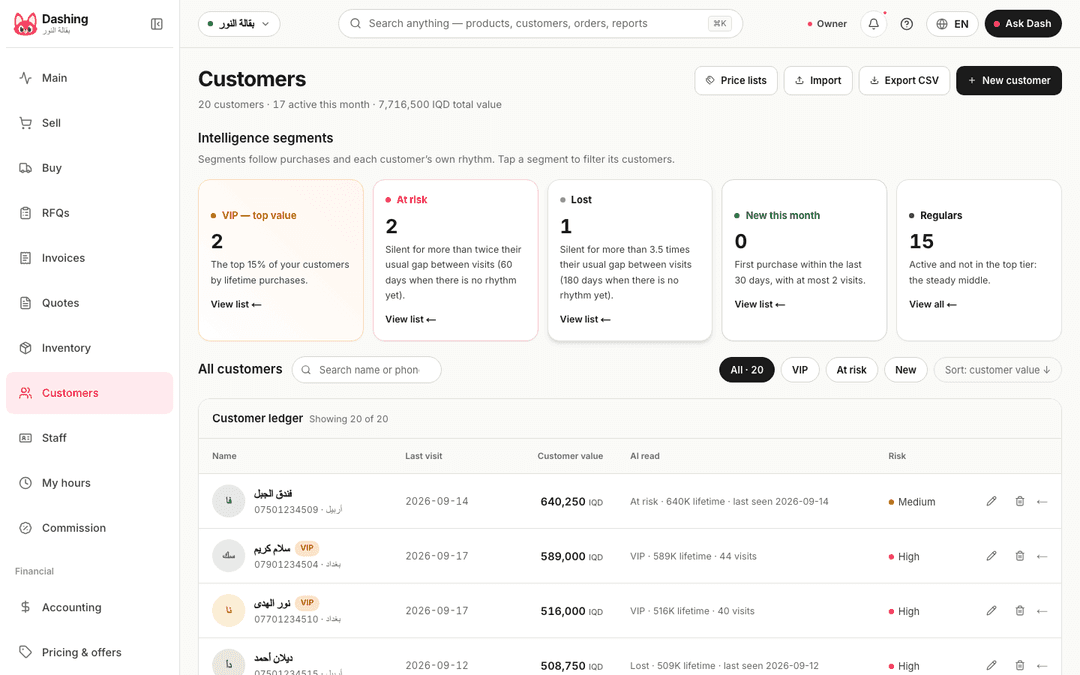
Watch it work
How much does each customer owe?
A credit sale posts to the customer's account at the moment of the sale, and each payment lowers the balance at once, applied to the oldest invoices first. You always know how much each customer owes you, and overdue amounts show in brackets of 30, 60 and 90 days.
A due date on each credit sale
When you sell on credit you set a due date on the invoice, and you can change it afterwards. Aging counts from that date rather than from the day of the sale, so someone whose date has not come yet does not show as late.
The reminder list: who do I chase today?
A customer joins the list when their oldest unpaid invoice is 3 days old, and rests for 14 days after each reminder. Your staff taps to open WhatsApp with the reminder message, then marks it sent or dismisses it. Sending is always done by your staff.
The statement on WhatsApp
One tap from the customer's page opens WhatsApp with a link to their statement: invoices, payments and balance, in the interface language. The link is valid for 30 days, then stops. You can write your shop's own payment instructions once, and they appear on the statement so the customer knows how to pay. No file is attached; if the customer wants a paper copy, the same page prints.
The limit and the exception
Each customer can have a credit limit. When a sale would exceed it, the cashier stops; a staff member with the override permission enters a reason and continues, and who did it and why, with the amount, goes to the audit log for the owner to see. There is no manager code to type in over the cashier's shoulder: the permission belongs to the account itself.
Try Dashing in your shop, free, no card.
Start freeThe morning card and who to collect first
The morning card shows how many customers are overdue and their total, and the receivables list sorts by amount or by age. You can also ask Dash: it ranks overdue customers by which payments would close the projected cash gap over the next 14 days, showing each customer's amount, days overdue and past payment record; when the projection is healthy, it tells you no urgent collection is needed.
Start free from your notebook
Try the free debt book on the web first, with no sign-up, or download the customer-debts template. When you want a live balance, reminders and a statement link, put your shop on the free plan.
What the free plan includes, and installing it
Debts, statements and unlimited users are all on the free plan. Dashing also installs on an Android phone as an app.
On an Android phone
Install it on your phone to open the debt book and send a statement from anywhere.
More than debts
- Credit and debit notes tied to their original invoice
- Installment sales: a payment plan on the invoice itself, each installment tracked on it; when a plan is canceled the deposit is kept by default and can be refunded
- A quote that becomes an invoice in one tap, and can be priced in dollars when the customer asks in dollars
- A recurring sale for a standing order (a restaurant that takes 200 loaves a day) invoices itself on its schedule and posts to the customer's account
- A price list and a default discount per customer or group, loyalty points earned and redeemed at the cashier, and gift cards with a balance
- A "regular customer went quiet" card on the home screen when a customer breaks their usual pattern; in the sample shop it listed 5 customers
What it does not do
No customer self-service portal and no automatic sending: your staff send every reminder and every statement with a tap. No marketing messages.
Common questions
How does the customer receive their statement?
One tap from their page opens WhatsApp with a link to their statement, with the invoices and payments, and the balance. The link is valid for 30 days, and no file is attached.
Does it block sales to someone over their limit?
Yes. The cashier stops until a staff member with the permission overrides it with a written reason, and it is logged with the name and the reason.
Does it send payment reminders on its own?
No. It shows you a list of who is due a reminder, and your staff member taps to open WhatsApp with the message and sends it themselves. No automatic messages.
Is the debt book free?
Yes. Debts, statements and the reminder list are on the free plan, and there is also a free debt book on the web with no sign-up.
From the blog
- Free accounting software for shops: real books? (October 2026)How to tell whether free accounting software has double entry, a balance sheet and a month close, and what Dashing's free plan includes.
- Free cashier software for shops: what 'free' means (Oct 2026)How to judge free cashier software: caps, trials that end, paid add-ons, and what Dashing's free plan includes, with no expiry date.
- An accounts program for a shop: what you need, and what is sold to youWhat an accounts program must do for a shop: real profit, debts by name and age, the drawer, books the accountant can open. And what is sold to you, unneeded.
- Cashier software in Iraq: a buyer's guide for shops (2026)What to look for in cashier software in Iraq: working offline, dinar and dollar, debts, card and wallet payments, stock, cost, and questions to ask any vendor.
Related
Try it in your shop, free, no card.
The free plan includes an offline cashier with stock, debts and accounting, and it stays free forever. What it includes